
SpeechPulse3.4.2 - Download
You'll be able to download in few seconds.
Publisher Description
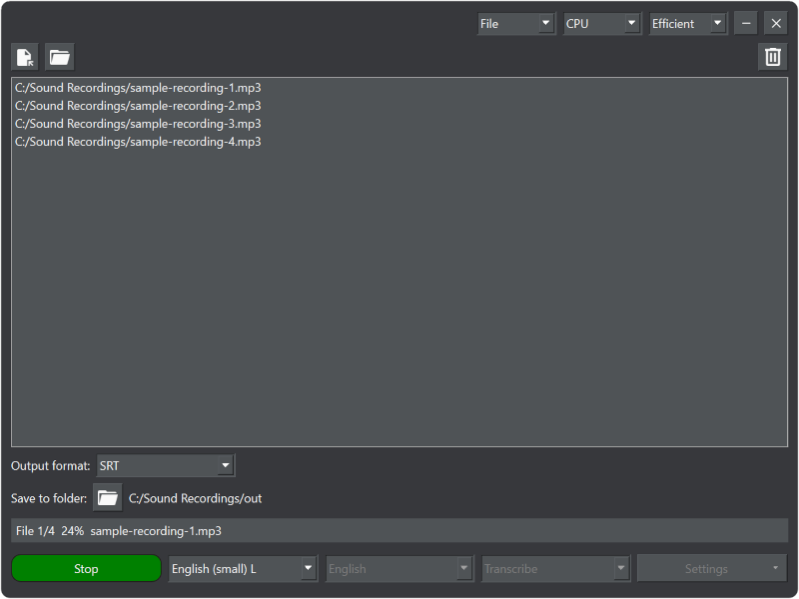
SpeechPulse converts your speech to text in real time using Whisper language models. It can type into your favorite apps, including text editors, web browsers, and office applications.
SpeechPulse can also transcribe audio/video files. Most audio/video file types, including mp3, mp4, WAV, m4a, FLAC, Ogg, and WebM, are supported. It can also generate SRT and VTT subtitles for audio/video files with accurate timestamps.
SpeechPulse can recognize speech in a variety of languages, including English, French, Spanish, Italian, German, Japanese, Chinese, and Russian.
To provide best-in-class accuracy, SpeechPulse uses Whisper speech-to-text models. It has excellent accuracy even in noisy environments.
SpeechPulse can also take advantage of your multi-core CPU or GPU to accelerate recognition. SpeechPulse is completely offline and does not require internet access.
About SpeechPulse
This Speech program is available in English. It was last updated on 29 September, 2026. SpeechPulse is compatible with the following operating systems: Windows.
The company that develops SpeechPulse is AV BEAM. The latest version released by its developer is 3.4.2.
The download we have available for SpeechPulse has a file size of 484.4 MB. Just click the green Download button above to start the downloading process. The program is listed on our website since 2023-12-13 and was downloaded 0 times. We have already checked if the download link is safe, however for your own protection we recommend that you scan the downloaded software with your antivirus. Your antivirus may detect the SpeechPulse as malware if the download link is broken.
How to install SpeechPulse on your Windows device:
- Click on the Download button on our website. This will start the download from the website of the developer.
- Once the SpeechPulse is downloaded click on it to start the setup process (assuming you are on a desktop computer).
- When the installation is finished you should be able to see and run the program.
Program Details
System requirements
Download information
Pricing
Version History
version 3.4.0
posted on 2023-12-13
Now supports Push-to-talk speech input with a new hotkey.
version 3.3.0
posted on 2023-12-13
Now supports direct text insertion, editing, and formatting in Microsoft Word.
A new button to minimize SpeechPulse to the system tray.
version 3.1.0
posted on 2023-12-13
Now remembers language model, device, microphone, and file mode output folder settings between sessions.
With the manual punctuation mode, you can dictate common punctuation marks like commas, periods, question marks, exclamation marks, colons, semicolons, etc.
version 3.3.4
posted on 2023-12-13
Now supports automatic turn-off, taskbar notifications, notification sounds, and direct text insertion in Microsoft WordPad.
version 3.1.0
posted on 2023-08-18
Now supports manual punctuation and custom prompts.
version 2.4.0
posted on 2023-08-18
Now comes with a built-in text editor for faster dictation.
version 2.3.0
posted on 2023-08-18
Custom voice hotkeys, text insertion with voice commands
version 2.1.0
posted on 2023-08-18
Added voice commands, Lower latency in live mode, In-place installer
version 1.1.0
posted on 2023-08-18
Better support for older Nvidia GPU models
version 1.0
posted on 2023-08-18
Supports subtitle generation
Disclaimer
External Download
We do not host SpeechPulse on our servers. We did not scan it for viruses, adware, spyware or other type of malware. This app is hosted by the software publisher and passed their terms and conditions to be listed there. We recommend caution when installing it.
The external download link for SpeechPulse is provided to you by apps112.com without any warranties, representations or guarantees of any kind, so access it at your own risk.
If you have questions regarding this particular app contact the publisher directly. For questions about the functionalities of apps112.com contact us.
